
I am tremendously excited to announce the release of the Windows Azure Toolkit for Windows Phone 7. This toolkit is designed to make it easier for your to build phone application that leverage cloud services running in Windows Azure. Our team has been diligently working on this toolkit for months, and I think you’ll like what you see.
Get the bits on CodePlex here: http://watoolkitwp7.codeplex.com/
Cloud services and phone applications are a powerful combination, and our goal is to make it as easy as we can for you to use Windows Azure to provide storage and services for your phone applications. Everything we’ve built in this toolkit is to simplify the experience and optimize your time. For example, rather than require you to learn any new semantics around storage or put in the time to build out membership services to provide authentication and authorization for your phone applications, we’ve done it for you and provide you with a sample demonstrating the necessary steps.
The toolkit contains the following pieces:
- Binaries – These are libraries we’ve written that you can use in your Windows Phone 7 applications to make it easier to work with Windows Azure (e.g. a full storage client library for blobs and tables). You can literally add these libraries to your existing Windows Phone 7 applications and immediate start leveraging services such as Windows Azure storage.
- Docs – We’ve provided documentation that covers setup and configuration, a review of the toolkit content, getting started, and some troubleshooting tips.
- Dependency Checker – As you’ve come to expect and love, we provide a full dependency checker to ensure that you have all the bits required in order to successfully use the toolkit.
- Project Templates – We have built VSIX (which is the unit of deployment for a Visual Studio 2010 Extension) files that create project templates that make it easy for you to build brand new applications.
- Samples – We have a sample application that fully leverages the toolkit, both available in C# and VB.NET. The sample application is also built into one of the two project templates created by the toolkit.
It’s easy to get started.
- Head over to http://watoolkitwp7.codeplex.com/ and download the latest package named WAZToolkitForWP7.exe. This file is a self-extracting executable, and will unpack the files on your disk.
- Your first step is to run WAZToolkitForWP7.exe. Accept the License Agreement (standard MS-PL) and click Install. Nothing is registered or installed on the O/S, so it makes it extremely easy to upgrade or remove.
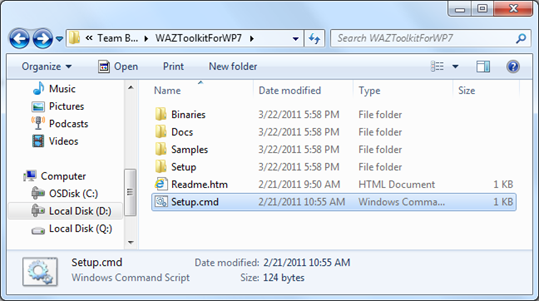
- Your next step is to run Setup.cmd. This launches the configuration wizard that will check prerequisites and install new project templates. Walk through the wizard and install any missing software. Please note that “Visual Basic for the Windows Phone Developer Tools RTW” is optional and not required.
- Once the dependency checker has completed, the Visual Studio Extension Installer will attempt to install the Windows Azure Toolkit for WP7 – make sure to click Install. This process runs the VSIX file that creates the two project templates.
- You can now close the wizard.
That’s it – you now have the toolkit setup and installed on your machine.
Head to Visual Studio and select File –> New –> Project. Select the Visual Studio –> Cloud templates. You will now see two new templates installed: Windows Phone 7 Cloud Application and Windows Phone 7 Empty Cloud Application. These project templates provide you with an out-of-the-box (don’t you love that phrase) experience for creating Windows Phone 7 application that use services running in Windows Azure.
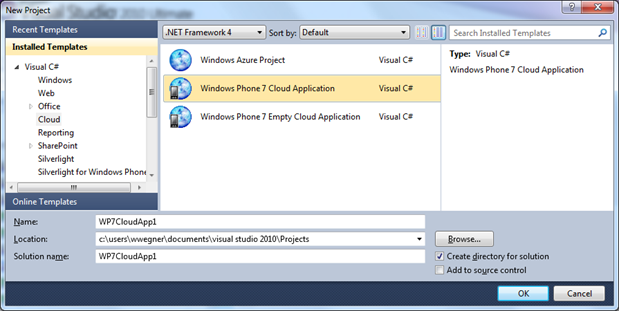
Click OK and create a new project.
A new project wizard will ask you for your Windows Azure storage account information. You can choose to either enter production storage account information or choose to use the local storage emulator – for your first time I’d recommend using the local storage emulator.
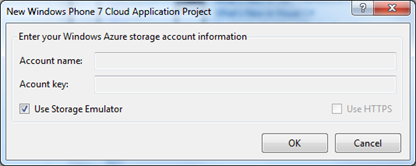
After you click OK your new solution is created for you. This solution includes three projects that provide you with the Windows Phone 7 client already configured to use Windows Azure storage and compute services and all the services used by the phone client in a Windows Azure web role project.
Simply hit F5 to build and run. Your phone application will launch in the Windows Phone 7 emulator, and your services will run in the Windows Azure compute emulator.
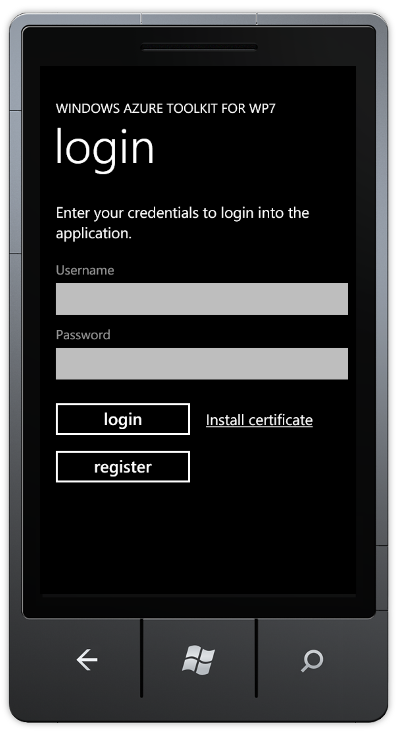
You’re now able to run the full Windows Phone 7 sample application locally on your machine!
For a detailed walkthrough, please see the Getting Started documentation on the CodePlex site. You can also find additional documentation and information on getting started.
One final closing thought – the toolkit is not yet complete. In fact, we’ve only just started . We already have additional work underway, and we plan to have many additional drops to provide additional capabilities and functionality. For example …
- Notification services for Windows Phone 7 (and other devices) that run in Windows Azure
- Support for Windows Azure queues
- More sample applications
- Multiple NuGet packages
- SQL Azure support & samples
- DataMarket support & samples
… and the list could go on and on. If you have feedback, or your own requests, please either leave a comment or send a message to waztoolkitwp7@microsoft.com.
I hope you enjoy!