I was browsing one of my new favorite websites, Microsoft’s Script Repository, when I came upon the Add “Command Prompt Here” to Windows Explorer" Web page. This script adds a “Command Prompt Here” command to the Windows Explorer system menu, so that if you select the command, a command window will open up in the same folder. Nifty, eh? Yes, I know, this has been around for quite awhile and is nothing new. But, with a little twist, this can become a lot more useful.
Personally, I never use “cmd.exe” by itself. I always use the “Visual Studio 2005 Command Prompt”, as it has all the useful and fun PATHs already added to it. So, with a small tweak to the script, we get the following enhancement:
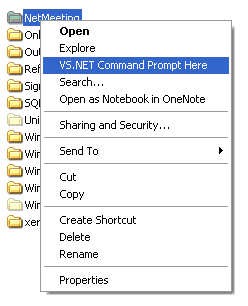
Very handy!
Here’s the script (it’s so simple that I’m embarassed to share it!):
Set objShell = CreateObject("WScript.Shell")

objShell.RegWrite "HKCRFolderShellMenuTextCommand", _
"cmd.exe ""C:Program FilesMicrosoft Visual Studio 8VCvcvarsall.bat"" x86 /k cd " & chr(34) & "%1" & chr(34)
objShell.RegWrite "HKCRFolderShellMenuText", "VS.NET Command Prompt Here"
As I said, pretty simple, but oh so useful!
CommandPromptHere.vbs (.29 KB)
I hope this helps!